
Can ChatGPT Teach Thai Tones? The Hard Structural Limit
Affiliate disclosure: This article contains affiliate links. We may earn a small commission at no extra cost to you. As an Amazon Associate, we earn from qualifying purchases.
About the reviewer

Ramy Hirano
Phuut Founder
Founder of Phuut. Has observed how Japanese and English speakers stumble on Thai and built learning products around those patterns.
Follow Phuut on X →ChatGPT can define all five Thai tones, give you example words for each, and walk through the consonant class rules in detail. It does this accurately. And if you’ve been using it to practice your actual pronunciation, your tones are probably still wrong - and ChatGPT has no idea.
This is not a Thai knowledge problem. ChatGPT can name every tone rule correctly, generate vocabulary lists by tone, and work through consonant class logic without error. It’s an architecture problem. ChatGPT works entirely in text. It has no microphone, no speech model, no way to hear what your voice actually produced. When you type “I said ข้าว, was that falling tone?” - it answers based on what you typed, not what you said.
This article covers three things: the exact architectural reason ChatGPT cannot correct your tones, what it genuinely can and cannot do for Thai study, and the three requirements any tool needs to actually correct spoken pronunciation.
In this article:
- What ChatGPT can actually do for Thai tones
- The architectural reason it cannot correct your pronunciation
- What an AI actually needs to correct Thai tones
- How to use ChatGPT and audio AI together
What ChatGPT can actually do for Thai tones
ChatGPT is genuinely useful for Thai - but only on the text side of tone learning.
Here’s the split that matters. Learning a tone involves two separate tasks: understanding the rule (cognitive), and producing the correct sound when you speak (physical). ChatGPT can help you with the first. It cannot help you with the second.
What ChatGPT does well:
- Tone rule explanations: Ask it to describe the pitch contour of the falling tone (starts high, drops to low), the mid tone (flat, mid pitch), the rising tone (dips then rises). It will explain these clearly and give you example words for each.
- Example words by tone: Ask for five falling-tone words, five low-tone words, and so on. You’ll get a solid drill list with Thai script and romanization.
- Consonant class and tone mark logic: “Why does ข้าว use a falling tone?” ChatGPT can work through the consonant class (high class) + tone mark rule that determines it. This is exactly the kind of rule-based reasoning it excels at.
- Script-level questions: “What tone does ดี use?” - it will answer correctly from script analysis.
- Minimal pair vocabulary: Ask for pairs that differ only in tone - ข้าว (rice, falling) and ข่าว (news, low), for example - and it will generate a useful study list.
Tone rule knowledge is the prerequisite for correct production. You can’t fix what you don’t understand. Most learners who struggle with tones are partly working from a fuzzy mental model of the rules - and ChatGPT is genuinely good at sharpening that model.
To build that foundation, start with how Thai’s five tones work and what makes them different. ChatGPT is an excellent companion for that stage of study.
What it does not include: any evaluation of your spoken output. ChatGPT answers questions about tones. It does not listen to your tones - and that gap is the whole problem.
The architectural reason it cannot correct your pronunciation
ChatGPT cannot correct your tones because of what it is, not what it knows.
ChatGPT is a text model. Its input channel is text - or image, in some versions. Not audio from your microphone. When you type a message, the text enters the model. Your voice never does. There is no speech pipeline, no microphone access, no system that processes phonetic input.
What happens when you “describe” your pronunciation to it:
Say you type: “I tried to say สวัสดี with a mid tone on the last syllable - did I get it right?”
ChatGPT reads that sentence and responds to it. It knows that ดี uses a mid tone. So it confirms: “Yes, ดี is a mid tone.” You feel validated. But your actual voice never entered the system. ChatGPT answered the question you asked (what tone does ดี use?) - not the question you needed answered (did your spoken output produce a mid tone?).
This is the confident-sounding but wrong failure mode. ChatGPT responds to your description with accurate tonal information, creating the impression that your pronunciation has been evaluated. It hasn’t. The feedback loop is based on your own written claim about what you said - not on your sound.
The result is false confidence. You walk away thinking your tone was confirmed correct. It was never tested. Over time, this is more damaging than not practicing at all: errors become embedded in muscle memory while you believe they’ve been corrected. This is the same fossilization pattern that explains why Thai tone errors become harder to fix the longer you practice them wrong.
Why this is architectural, not a feature gap:
You might be thinking about ChatGPT’s voice mode. It’s worth clarifying exactly what voice mode does. When you speak into ChatGPT with voice mode active, the audio is transcribed to text first - then the language model processes that text. ChatGPT voice mode is a speech-to-text pipeline feeding a language model. It does not run a Thai-specific tone classifier. It does not evaluate your pitch contour. It identifies the words you said; it does not identify which tone you used when saying them.
“Voice mode” does not equal tone feedback. The pipeline identifies words, not pitch contours - the architectural gap is unchanged.
What an AI actually needs to correct Thai tones
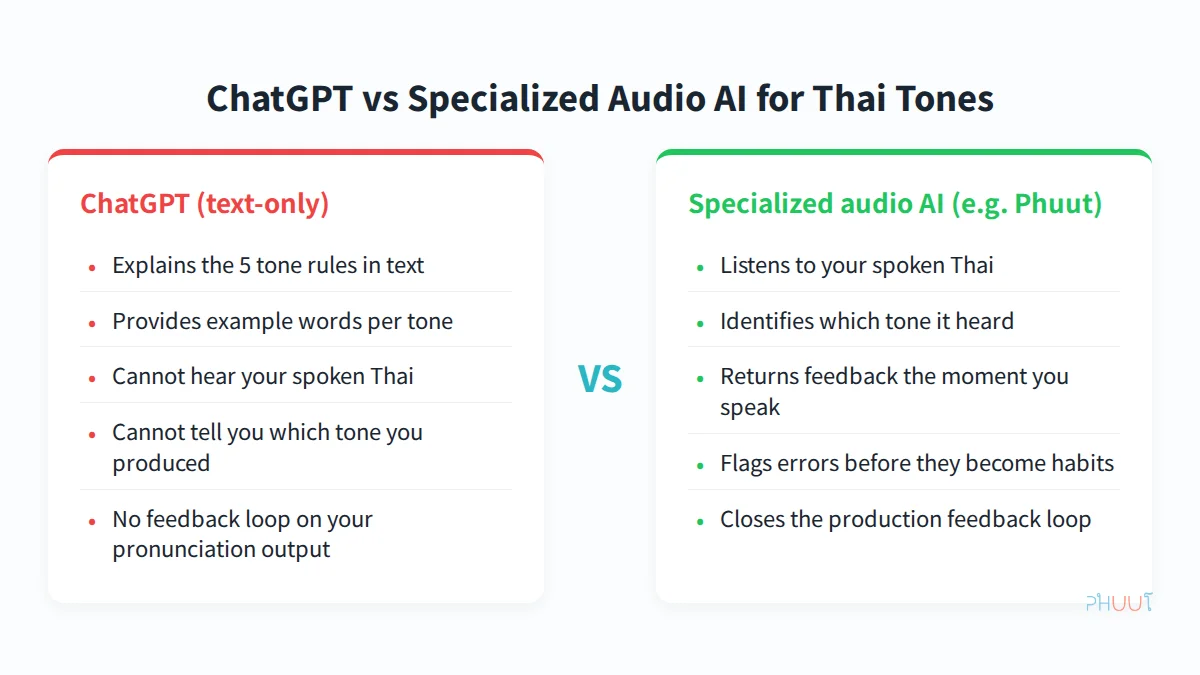
Any tool that claims to correct your Thai tones must meet three specific requirements. If it can’t meet all three, it cannot return tone-specific feedback on what you actually said.
Requirement 1: Speech input
The tool must receive your actual voice. Not a text description of your voice. Not a transcribed version of your voice that then gets analyzed as text. Your raw audio needs to enter a system that processes it as phonetic information.
This is the non-negotiable gate. Without speech input, no tone correction is possible. Full stop.
Requirement 2: A Thai-aware tone classifier
The speech model must be specifically calibrated for Thai tones. This matters more than it sounds. Generic speech recognition - the kind built to transcribe English or European languages accurately - is not designed to distinguish Thai’s five tones on the same syllable.
A tool that uses generic speech-to-text and tells you “I understood the word you said” is giving you word-recognition feedback, not tone feedback. Those are entirely different signals. You need a model that can distinguish between ม้า (horse, rising tone) and มา (come, mid tone) - same syllable, different pitch contour - and tell you which one it heard.
Requirement 3: Tone-specific output
The feedback must name which tone it heard. “Incorrect” does not help you improve. If your falling tone came out mid, you need to know that. “I heard a mid tone” gives you a direction. “Wrong” gives you nothing.
Tone-specific output turns error detection into error correction. It closes the feedback loop.
How Phuut meets all three:
In Phuut’s pronunciation game mode, you speak a Thai word into your microphone. The app uses a Thai-aware speech model that distinguishes the five tones - it can tell a rising ม้า from a mid มา. After you speak, it returns feedback naming which tone it detected and whether that matches the target. The feedback is directional.
Phuut covers around 3,850 words across A1 to B2 levels, with 8 game modes including the pronunciation practice mode that delivers this feedback. The Pro plan is $4.99 per month.
That three-requirement framework is the standard to apply to any AI Thai learning tool you try - not just Phuut. Check the production feedback gap in Thai tone self-study for a broader look at how different tools measure up.

How to use ChatGPT and audio AI together
The answer here is not “stop using ChatGPT.” It’s “use each tool for what it can actually do.”
ChatGPT’s text-based strengths are genuine. Explaining tone rules, generating vocabulary lists by tone, answering grammar and script questions - ChatGPT handles all of these accurately. Replacing them with a specialized audio app makes no sense. Use both tools, each for what it does.
| ChatGPT’s role (text) | Audio AI’s role (speech) |
|---|---|
| Explain the 5 tone contours | Evaluate your spoken tone |
| Answer “why is this word falling tone?” | Return “I heard mid tone - try again” |
| Generate vocabulary lists by tone | Track which tones you consistently miss |
| Q&A on grammar, script, consonant class | Pressure-test tones in Boss Battle |
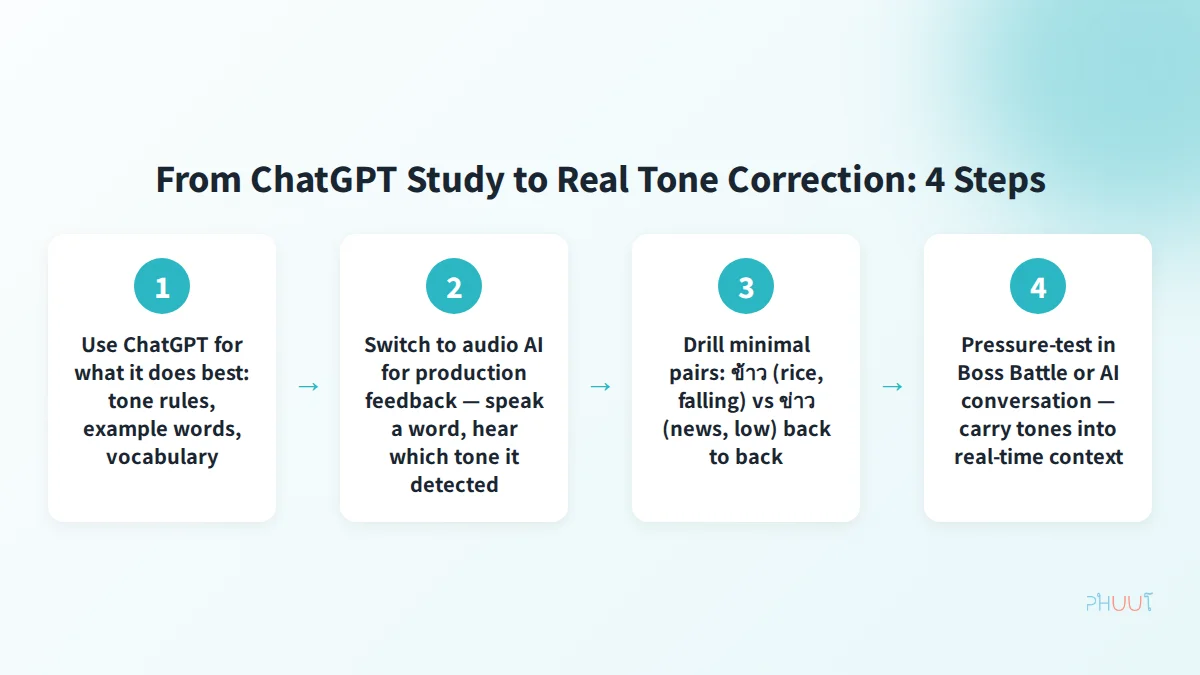
Practical 4-step sequence:
Step 1 - ChatGPT phase (rules and vocabulary) Learn the five tone contours with example words. Ask for minimal pairs by tone. Ask why a specific word has the tone it does (consonant class + tone mark logic). Build your mental model first.
Step 2 - Audio AI phase (production feedback) Speak words from step 1 into a pronunciation feedback tool. The app tells you which tone it heard - “I detected a mid tone” - not just whether you were right or wrong. Work 5-10 words per session rather than sampling broadly. The correction-repeat loop only sticks if you stay on a word long enough for muscle memory to register the difference. This is the first point at which you’ll find out whether your spoken output matches your mental model.
Step 3 - Minimal pairs drill Run the specific pairs where you made errors - falling versus low, mid versus rising - back to back. Commit to your spoken output before Phuut plays the reference audio for that word. The deliberate commitment forces production rather than passive recognition.
Step 4 - Pressure test Boss Battle in Phuut or an AI conversation to carry those individual-word tones into real-time context. Cognitive load during conversation reveals whether a correction has actually stuck or whether you can only produce it in slow, focused conditions.
For more on putting this into practice, see getting started with AI Thai speaking practice.

Build a Thai habit that actually sticks
Free on iOS & Android
Willpower isn't a strategy. Phuut bakes proven learning science into the app so you just need to tap for 5 minutes a day.
- Spaced repetition (SRS) tuned to forgetting curves
- CEFR A1–B2 and Thai proficiency-test vocabulary only
- Paiboon transliteration fixes the read-but-can't-speak gap
- Free on iOS & Android — the structure handles the discipline for you
The short version
Think of it this way: ChatGPT closes the knowledge gap; audio AI closes the production gap. Neither tool alone can do both.
ChatGPT’s limitation with Thai tones is not about knowledge. It operates in text - no microphone, no speech model, no way to hear your voice. What it does well: explain the rules, provide example words, answer your script and grammar questions. It handles all of that accurately.
Audio AI does the other half: it receives your voice, runs it through a Thai-aware tone classifier, and tells you which tone it heard. That feedback - “I detected a mid tone, target was falling” - is something ChatGPT structurally cannot produce.
The formula is simple. ChatGPT = your tone teacher. Phuut = your tone mirror. Use the teacher to build the mental model. Use the mirror to find out whether what you’re saying matches what you think you’re saying. Start with one word in Phuut’s pronunciation mode. You’ll find out immediately - and that’s the only information that actually leads to correction.
Build a Thai habit that actually sticks
Free on iOS & Android
Willpower isn't a strategy. Phuut bakes proven learning science into the app so you just need to tap for 5 minutes a day.
- Spaced repetition (SRS) tuned to forgetting curves
- CEFR A1–B2 and Thai proficiency-test vocabulary only
- Paiboon transliteration fixes the read-but-can't-speak gap
- Free on iOS & Android — the structure handles the discipline for you